
When Terraform adopted the Business Source License (BSL), it sent a ripple through DevOps and cloud engineering teams worldwide. Many organizations that had built years of infrastructure automation on Terraform began looking for an open alternative. That alternative arrived quickly: OpenTofu.
OpenTofu is the product of the open-source community coming together in response to the Terraform change. They forked Terraform, created OpenTofu, and handed over its governance to the Linux Foundation. OpenTofu maintains compatibility with Terraform 1.6 while ensuring the tool remains open-source and available indefinitely.
With Infrastructure as Code (IaC) at the core of automation and governance, relying on a tool with changing license terms introduces long-term uncertainty. That’s why organizations are now actively evaluating a migration path to OpenTofu.
So how can existing Terraform users get started with OpenTofu? This article describes everything you need to know to migrate from Terraform to OpenTofu: How to prepare your environment, perform the migration, validate your infrastructure, and operate your IaC setup afterward.
Why migration to OpenTofu matters
Migrating to OpenTofu is more than a response to a licensing change. It’s a decision about long-term control over infrastructure automation, governance, and how platforms evolve over time. As IaC becomes tightly integrated with security controls, audits, and delivery workflows, many teams are choosing tools that provide predictable governance and a strong open-source foundation.
IaC defines how we provision and manage environments automatically and reproducibly. Therefore, switching the IaC tool isn’t just a matter of changing the CLI, it also affects infrastructure, pipelines, governance, compliance, and auditability.
Migrating to OpenTofu doesn’t mean rewriting your Terraform files. It means maintaining a stable, security infrastructure while migrating to an open platform. OpenTofu shares the same commands and structure as Terraform, but what sets it apart is its open-source and community-driven approach. This means that IT organizations can use AWS automation without worrying about vendor limits.
Understanding OpenTofu compatibility
OpenTofu was forked directly from Terraform 1.6, which means that nearly every configuration that runs on Terraform will also run on OpenTofu with no changes required.
Primary factors of compatibility:
- Uses the same HCL syntax.
- Maintains the same provider logic as the AWS provider.
- Reads and writes the same state file format.
- Supports existing Terraform modules and registries.
Main differences:
- The command-line binary changes from “terraform” to “tofu”.
- OpenTofu maintains its own open registry (still compatible with Terraform registry sources).
- Licensed under MPL 2.0, for long-term openness.
Preparing for migration
The following steps will prepare your environment for migrating to OpenTofu
Check current Terraform version and environment details
terraform version
terraform providers
terraform workspace list
Terraform v1.5 or later should be running in all environments
Verify AWS backend configuration
We’ll use Amazon S3 for the remote state. Your backend.tf file should look similar to the following:
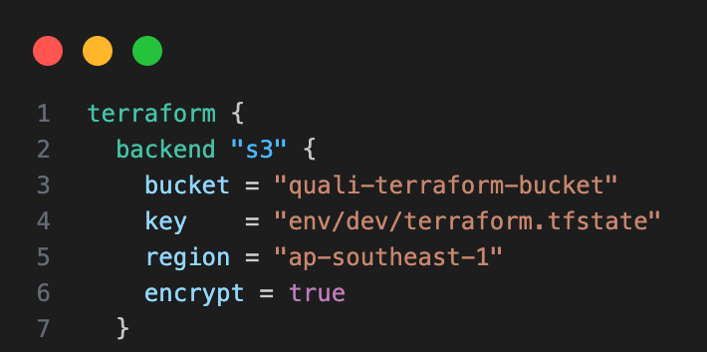
Figure 1: backend.tf file
OpenTofu will automatically reuse this backend, with no backend migration required.
Back up your Terraform state
Never start a migration without a full state backup. These files enable instant rollback if something goes wrong.
aws s3 cp s3://quali-terraform-bucket/env/dev/terraform.tfstate./terraform.tfstate.backup
terraform show > pre_migration_snapshot.txt
Keep both backups safe and versioned in Git or an Amazon S3 versioned bucket.
Validate configurations
Run basic Terraform commands to make sure the project is clean:
terraform fit -recursive
terraform validate
terraform plan
If the plan output says “No changes. Infrastructure is up-to-date.” your Terraform stack is stable and ready to migrate.
Building the Terraform project
Let’s outline the existing Terraform environment that we’ll migrate.
The following stack deploys a simple AWS virtual private cloud (VPC) with a subnet, route table, security group, and one Amazon EC2 instance.
Project structure
- tf: Defines remote backend on Amazon S3.
- tf: Provisions AWS resources.
- tf: Prints resource IDs after deployment.
- tf: Configure Terraform and AWS provider versions.
- tf: Variables for AWS services.
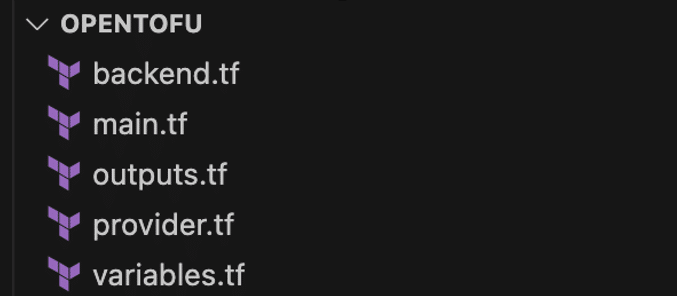
Figure 2: Terraform Project Structure
Initialize and apply:
terraform init
terraform apply
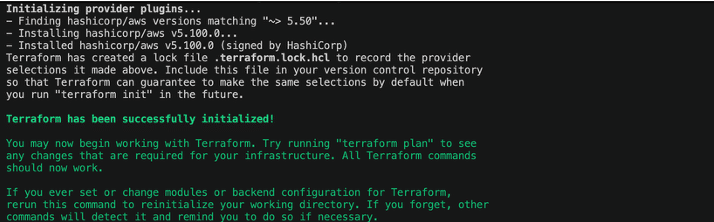
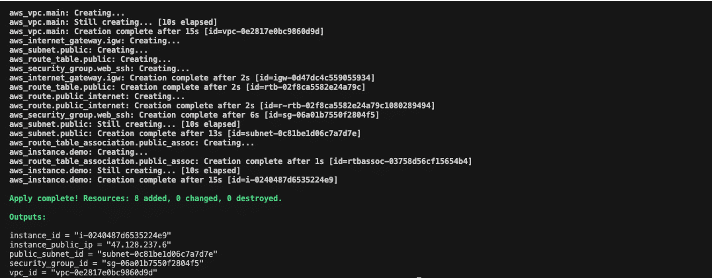
Figure 4: Terraform Plan output
In the AWS Console, you can confirm the Amazon EC2 instance and VPC resources. These components make up the baseline Terraform stack which we’ll now migrate to OpenTofu.
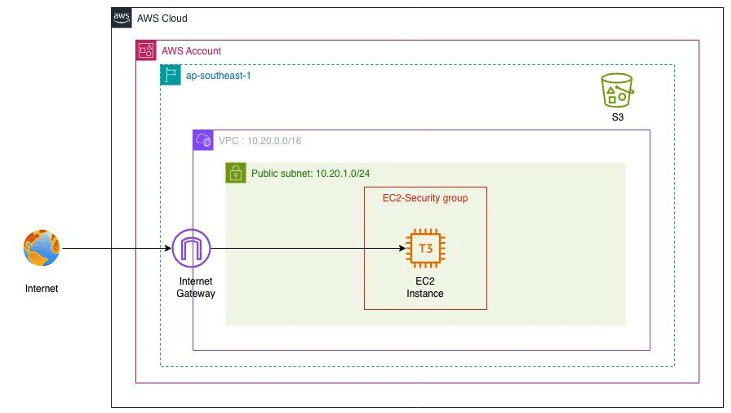
Figure 5: Terraform Project Architecture Diagram
Migration from Terraform to OpenTofu
Migrating Terraform to OpenTofu needs to be handled carefully because the state file is tied directly to running infrastructure. Mistakes at this stage can cause state mismatches, unexpected changes, or broken deployments. The steps below focus on keeping the existing infrastructure intact, confirming that state is reused correctly, and ensuring there is a clear rollback path if something goes wrong.
First, you’ll need to check your AWS infrastructure and validate that it’s stable. Now we’ll actually perform the migration, step by step, moving from Terraform to OpenTofu without breaking any existing infrastructure or losing state.
The key thing to understand here is that OpenTofu is not a rewrite of the original. It’s a continuation of Terraform’s open-core design. Both tools share the same language (HCL), backend formats, and provider interfaces. That means the migration doesn’t involve rebuilding infrastructure or converting code.
These steps keep your existing infrastructure and state intact. At any point, you can switch back to Terraform using your backed-up state without impacting running resources.
Install OpenTofu
Install the OpenTofu CLI (macOS):
If you already have Homebrew installed, this is the easiest way.
brew install opentofu
Verify the OpenTofu version.
tofu version

Figure 6: OpenTofu Version
Initialize OpenTofu in the existing Terraform directory
Navigate to your Terraform project folder and run the following command:
tofu init
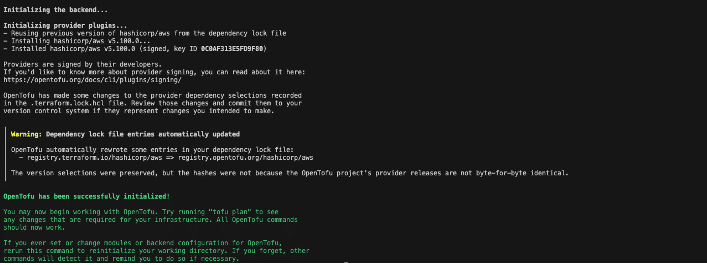
Figure 7: OpenTofu tofu init output
You’ll see an “OpenTofu has been successfully initialized!” dialog. OpenTofu automatically detects and connects to your existing backend configuration.
Migrate the state
Although the file format is identical, it’s a best practice to confirm the state detection explicitly:
tofu init -migrate-state
tofu state list

Figure 8: resources in state file
Validate the plan output
Run the tofu plan to check for any infrastructure changes:

Figure 9: OpenTofu tofu plan output
This confirms the migration is successful. OpenTofu can read and plan your environment using the same backend and state.
Verify with minor code changes
To verify the “terraform apply” process. In this demo, rename the Amazon EC2 instance tag.
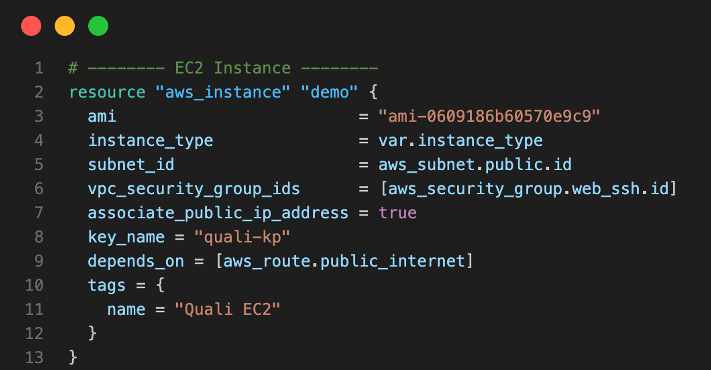
Figure 10: Change EC2 tag name “Quali EC2)
Then execute the following open tofu commands:
tofu plan
tofu apply
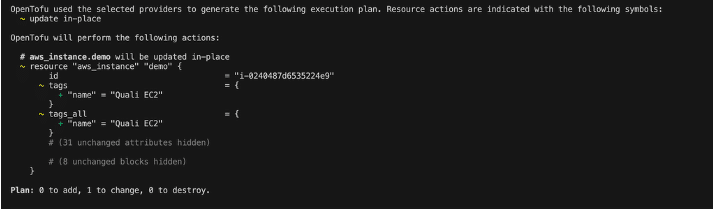
Figure 11: OpenTofu tofu plan output
OpenTofu will detect only the tag change and apply it.
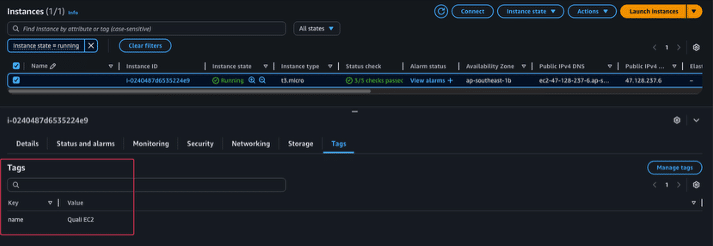
Figure 12: EC2 tag is applied
We can see the updated tag value, which means that OpenTofu correctly applies infrastructure changes using the same state.
Verify the state file update
Checking the Terraform state file after applying changes ensures that OpenTofu is correctly writing updates to the same S3 backend previously used by Terraform.
aws s3 ls s3://quali-terraform-bucket/env/dev/
tofu state show aws_instance.demo
You’ll see that the most recently modified timestamp has been updated, indicating that OpenTofu successfully wrote to the Amazon S3 backend.
Rollback options
If you need to roll back, simply reinstall Terraform and re-initialize:
terraform init
terraform plan
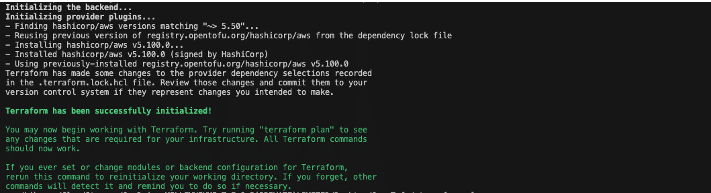

Figure 14: terraform plan output
Terraform and OpenTofu share identical state formats, so rollback is instantaneous and non-disruptive. Having a rollback option also makes these migrations easier to approve internally. Teams that are cautious about changes to core infrastructure are more likely to support the move when they know it can be reversed quickly and safely if needed
Managing version and providers
OpenTofu continues using the same provider locking mechanism as Terraform. The file .terraform.lock.hcl ensures consistent provider versions.
If the migration shows any provider mismatch, you can regenerate locks:
tofu providers lock

Figure 15: Verified no provider mismatches
Post-migration validation
After the migration, confirm your infrastructure is stable and that there haven’t been any infrastructure changes:
- Run tofu plan: It should show “No changes. Infrastructure is up-to-date.”
tofu plan

Figure 16: tofu plan output
2.Validate OpenToFu code syntax:
tofu validate

Figure 17: tofu validate output
3.Check the state file update time in Amazon S3:
aws s3 ls s3://quali-terraform-bucket/env/dev/
4.Optionally, you can export the plan for audit:
tofu plan -out=tfplan
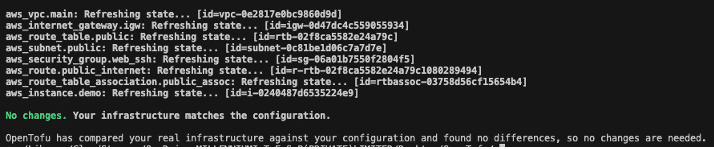
Figure 18: exporting the tofuplan output
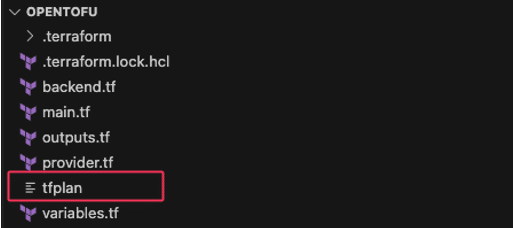
Figure 19: tofu plan output file
Once these checks have all passed, your migration fromTerraform to OpenTofu has completed.
Governance and security for migration
Best practices for governance and security during and after the migration include
- IAM Rules: Limit who can modify and access state files, and ensure that only specific IAM roles are allowed to write to the S3 bucket.
- S3 versioning: Always enable S3 versioning for your state file bucket. If you enable versioning, you can revert to an earlier version of a state file if it becomes corrupted or deleted.
- Encryption: Your state file contains sensitive data, such as resource IDs and ARNs, as well as potentially temporary passwords or secrets. State file written to the S3 bucket should be encrypted with KMS.
- Access control: Avoid hardcoding credentials inside your Terraform or OpenTofu configuration.
Drift detection: After migration, drift may occur when changes to basic infrastructure happen outside of IaC tool. Set up regular drift checks with
tofu plan -detailed-exitcode
Drift: 0 means everything is consistent.
These practices should continue after the migration as part of normal platform governance. Controlling access to the state file, keeping version history, and monitoring for drift makes it easier to support audits, respond to security reviews, and explain infrastructure changes over time.
Conclusion
Migrating from Terraform to OpenTofu is a well-structured and straightforward process.The switch to OpenTofu is both low-risk and high-value because it doesn’t require rewriting code or rebuilding infrastructure. It also provides a stable and fully open base for future automation.
In our example, we successfully deployed a Terraform environment, migrated it to OpenTofu, validated the plan, and confirmed backend integrity, all using the same IaC files. While OpenTofu works as a drop-in replacement today, its real value is longer term. OpenTofu is now the path forward for open, secure, and community-driven Infrastructure-as-Code deployment.
As you adopt OpenTofu for Infrastructure as Code, managing environments, governance, and self-service provisioning becomes a key part of operating at scale. Platforms like Quali Torque ensure teams can take their IaC beyond deployment by turning your existing configurations into reusable environment templates, providing self-service access, enforcing governance policies, and continuously monitoring infrastructure for drift or misconfiguration.
To learn more about how Torque enhances OpenTofu and Terraform visit the Quali OpenTofu page, the Quali Terraform page or explore our IaC code tools for even more information.